Easy installation, Durable build, Lightweight, Supports multiple paper sizes
Capacity
Holds up to 100 sheets
Pattern
Plain
For Use In
HP LaserJet Pro P1606dn, P1606, and compatible models
Product Type
Output Tray
Weight
Approx. 85 g
Storage Instructions
Store in a cool, dry place
Compatible Brand
HP
Model No
1606 Output Tray
Noise Level
Silent
Installation Type
Snap-fit, Tool-free
Compatible Devices
HP LaserJet Pro Series
Replacement Part Number
RM1-7363-000CN
Recyclable
Yes
Package Includes
1 x Output Tray
Surface Finish
Matte
Material
High-quality plastic
Operating Temperature
10C to 32.5C
About HP 1606 OUTPUT TRAY
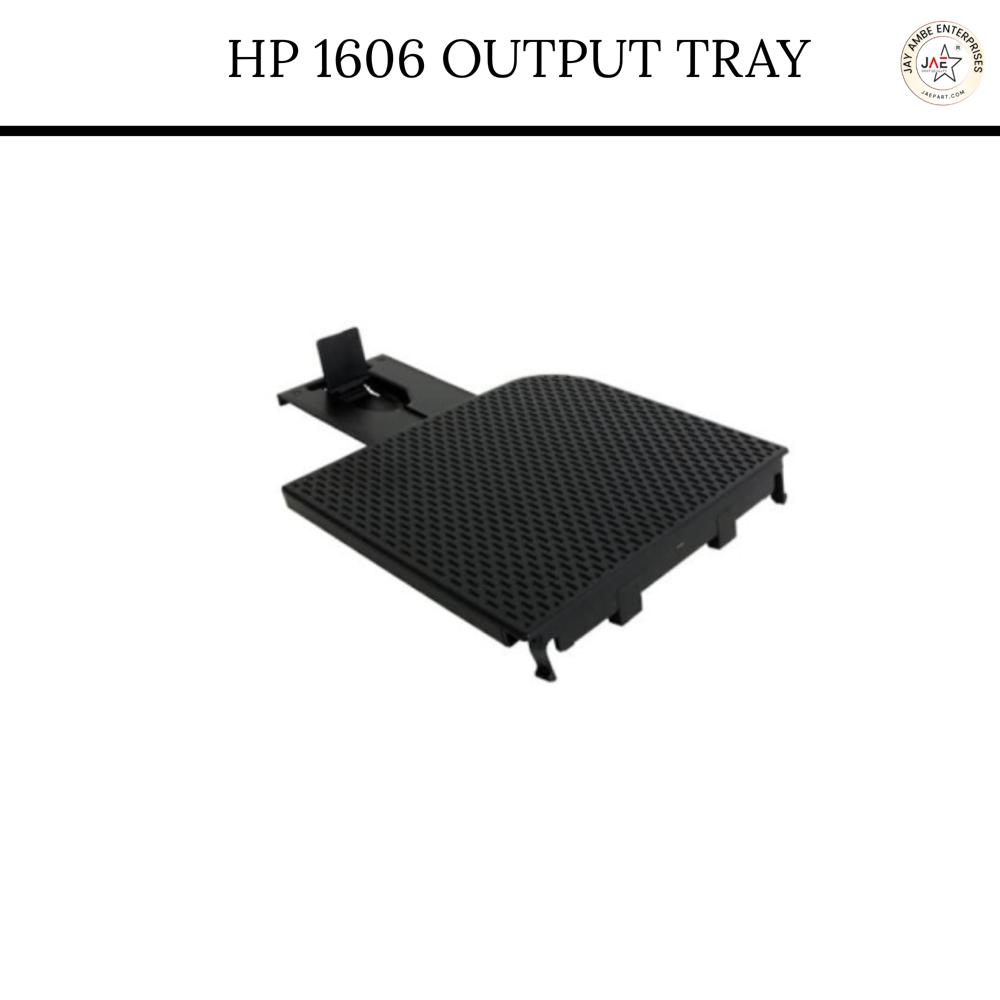
The HP LaserJet P1606dn output tray is a 150-sheet face-down, black plastic, snap-fit tray designed for the top of the printer. It acts as a paper catcher for printed documents, preventing spillage and misfeeds, with a textured surface for durability. The part is often compatible with the HP LaserJet M1536dnf, P1566, and M202 series (Part No: RM1-7498, RC2-9441).
Key Features & Description:
Capacity: 150 sheets (face-down).
Design: Snap-fit for tool-free installation and removal.
Color/Material: Durable black ABS plastic, typically with a textured surface.
Function: Provides organized stacking of printed papers (A4, Letter).
Compatibility: Designed for HP LaserJet P1606dn, P1566, M1536dnf, M202, and CP1525 printers.
Replacement Information:
Part Numbers: Often referred to by part numbers RM1-7498 or RC2-9441.
Condition: Available as new/compatible import parts.
Installation: Simply align the tray with the slots on the top of the printer and click it into place.
Effortless Installation and Reliable Compatibility
Designed for quick, tool-free setup, the HP 1606 Output Tray features a snap-fit mechanism, making installation simple and efficient. Its compatibility with HP LaserJet Pro P1606dn, P1606, and other models ensures a secure fit and hassle-free integration. Benefit from a part that matches the quality and reliability of your printer.
Durable and Eco-Friendly Build
Crafted from high-quality, recyclable plastic, this output tray offers both durability and sustainability. The matte finish provides a professional appearance while the robust construction withstands daily use. Keep your workspace efficient and eco-conscious with this responsibly designed replacement part.
Optimized for Quiet, Versatile Performance
Operating silently, the HP 1606 Output Tray accommodates up to 100 sheets of A4 or Letter paper. Its lightweight design means it won't add unnecessary bulk to your printer, and it easily handles varying workloads-perfect for busy office environments.
FAQ's of HP 1606 OUTPUT TRAY:
Q: How do I install the HP 1606 Output Tray on my LaserJet Pro printer?
A: Installation is straightforward thanks to the tray's snap-fit, tool-free design. Simply align the tray with your printer's output slot, gently press it into place until it clicks, and it's ready to use. No tools or technical expertise are required.
Q: What paper sizes and printer models are compatible with this output tray?
A: The tray supports standard A4 and Letter sizes and is compatible with HP LaserJet Pro P1606dn, P1606, and other models within the HP LaserJet Pro Series. Check your printer's model for compatibility before purchase.
Q: When should I replace my printer's output tray with a new one?
A: Replace your output tray if you notice cracks, warping, or poor paper support. Regular replacement ensures smooth handling of up to 100 sheets and prevents output jams, contributing to uninterrupted print operations.
Q: Where can I purchase the HP 1606 Output Tray in India?
A: You can buy the output tray from authorized HP dealers, distributors, wholesalers, and retailers across India. It is also available from suppliers, importers, and exporters specializing in HP printer accessories.
Q: What is the recommended process for storing the output tray when not in use?
A: Store the tray in a cool, dry place away from direct sunlight or high humidity. This prevents material degradation, maintaining the tray's durability and finish between uses.
Q: How does using the HP 1606 Output Tray benefit my printing setup?
A: Using this tray ensures organized and efficient paper management. Its durable build supports frequent, high-volume use without compromising output quality, while its recyclable material aligns with eco-friendly practices.
Tell us about your requirement
Price:
Quantity
Select Unit
50
100
200
250
500
1000+
Additional detail
Mobile number
Email
Name
Comapny Name
Phone Number
Email Id
City / State
Confirm Your Requirement
Verification Code
Did not receive yet?
Resend OTP
You’re Done!
We have received your requirements and will reply shortly with the best price.
 Maharashtra, India







 Send Inquiry
 Send Inquiry
 Send SMS